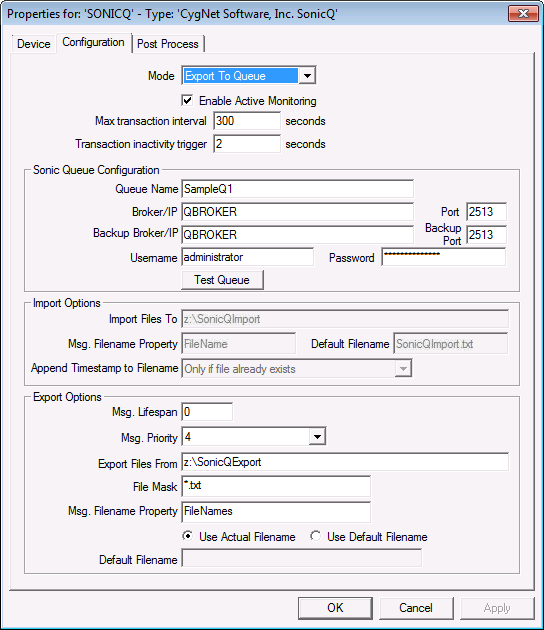
The properties for each section of this page are described below.
| Property | Description |
|---|---|
|
General Settings |
|
|
Mode |
The mode of the device. Either importing from a queue to the file system, or exporting from the file system to a queue. |
|
Enable Active Monitoring |
Actively monitor the directory or queue for new items. If disabled, the device will only look for new items in response to the IMPORT or EXPORT commands. |
|
Max transaction interval |
Type the maximum transaction interval in seconds. Default is 300 seconds. |
|
Transaction inactivity trigger |
Type an inactivity trigger. Default is 2 seconds. |
|
Sonic Queue Configuration |
|
|
Queue Name |
The name of the Sonic queue to connect to. |
|
Broker/IP |
The location of the machine hosting the Sonic MQ©. This can either be a TCP/IP address, or a network computer name. |
|
Port |
The port number the Sonic queue is running on. |
|
Backup Broker/IP |
The secondary broker used in case the primary broker fails. |
|
Backup Port |
The port associated with the secondary broker. |
|
Username |
Username required to connect to the Sonic queue. |
|
Password |
Password required to connect to the Sonic queue. |
|
Test Queue |
This button validates the Sonic queue settings by attempting to connect to the queue. |
|
Import Options |
|
|
Import Files To |
Local directory for queue file storage. It must be local to the file system of the UIS service. |
|
Msg. Filename Property |
Property in the Sonic message that holds the name of the file. |
|
Default Filename |
Default file name to use if the message doesn't specify one. |
|
Append Timestamp to Filename |
Select desired setting for appending timestamp to the name of the file. |
|
Export Options |
|
|
Msg. Lifespan |
The amount of time for the file to stay on the Sonic queue. Choose zero for infinite. |
|
Msg. Priority |
The priority of the Sonic message. Messages with a higher priority are processed first. |
|
Export Files From |
Local directory from which to export files out to the Sonic queue. It must be local to the file system of the UIS service. |
|
File Mask |
A filter to determine which type of files to export to the Sonic queue. For example a value of '*.*' will export all files, or a value of '*.txt' will only export text files. |
|
Msg. Filename Property |
Property in the Sonic message which holds the name of the original file. |
|
Use Actual Filename |
If enabled, the actual file name of the file will be set in the message. |
|
Use Default Filename |
If enabled, the default file name will be set in the message. Note: This means all messages placed on the Sonic queue will have the same file name. |
|
Default Filename |
Default file name to use if the 'Use Default Filename' option is selected. |

|
|
|

